Audiobooks already on your phone
Choose your audiobook folder with Android’s system picker. Kelp reads MP3, M4A, and M4B files without requesting broad storage access.
 OtterSuite
 KelpAudiobook player · Android 9+
Your books. Your player.
Play your MP3, M4A, and M4B audiobooks offline. Choose a folder, keep your place, and listen at your own speed with chapters, bookmarks, and sleep timers.
Built for the way you use it
Choose your audiobook folder with Android’s system picker. Kelp reads MP3, M4A, and M4B files without requesting broad storage access.
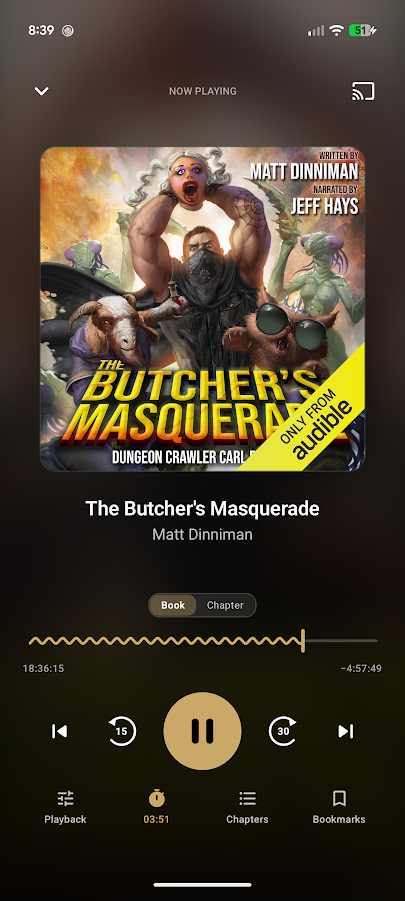
Resume with saved progress and speed. Multi-file books play on one continuous timeline, with chapter navigation and configurable skips.
Set a sleep timer or stop at the end of a chapter. Bookmarks and smart rewind help you return to the story.
Keep playing in the background. Use lock-screen, headphone, Bluetooth, and Android Auto controls.
An optional lifetime purchase adds collections, metadata editing, silence skipping, volume normalization, listening insights, backup, and bookmark notes.
Kelp Pro adds casting to Chromecast and Google TV. Local listening works without a Kelp account or subscription.
How it works
Put your MP3, M4A, or M4B audiobooks in an accessible folder on your Android phone.
Android’s system picker gives Kelp access to the audiobook folder you select. Your original audio stays there.
Open a book, choose your speed, and keep listening. Kelp remembers where you stopped.
Privacy, in plain language
Your audiobook files, progress, bookmarks, and listening history stay on your device. Optional metadata lookup, Google Play billing, and Cast are disclosed in the privacy policy.
Read Kelp’s policyBefore you install
Kelp plays audiobook files you already have. It does not include, sell, or stream an audiobook catalog.
Yes. Choose a folder containing your MP3, M4A, or M4B audiobooks. Local playback works offline. Optional metadata lookup, Google Play purchases, and Cast have separate connection requirements.
No Kelp account is required. Your library, saved progress, and listening history stay on your device.
Kelp Pro is an optional lifetime purchase. It adds collections, metadata search and editing, silence skipping, volume normalization, listening insights, backup and restore, bookmark notes, and casting to Chromecast and Google TV.
You can reuse audio files that are accessible on your device. Do not assume another player's saved positions, bookmarks, or history will transfer to Kelp. Keep your old player until you have checked your files and resumed your current book.